Capture Effects allow user to apply advanced post-processing to captured image.
Capture Effects can be set up in Capture Scenario Settings window. This is a convenient way to add borders, shadows and other effects that will automatically applied to all future captures made with that Capture Scenario.
Capture Effects can also be modified in Capture Editor after the capture is done. For instance, if you wanted a capture without shadows, but forgot to change your Capture Scenario effects, you still can remove shadow afterwards.
See Capture Effects for more info.
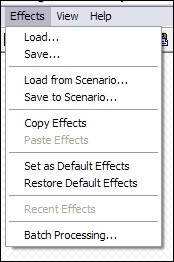
Captus Editor provides advanced Effects Menu for operations with effects:
Using this menu you will be able to copy/paste effects between scenarios, load/save them to external files, store current set of effects as default.
Batch Processing will allow you to apply set of effects to multiple files. See Batch Processing for detailed info.
See also Flatten Effects And Objects.
Here's the list of effects available in this release of Captus: