
Spotlight Tool creates/edits an Spotlight Object.
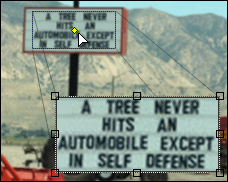
Spotlight Tool allows user to accentuate rectangular or elliptical area of the image and display its magnified and highlighted snapshot in any place of the image.
Little yellow diamond-shaped dot can be used to drag around the rectangle inscribing the area of the original picture to be spotlighted. Surrounding area can be blurred and dimmed to emphesize the spotlight rectangle.
 |
See also